Step Counter app icon

Step Counter

Handy Apps · Health & Fitness

Count every step and close your daily goal

Steps are counted automatically — no start button. See how far you are from your goal, keep your streak alive and walk the rest with a GPS walk.

Free on the App Store · iPhone

step counting, no start button
Autostep counting, no start button
free streak freeze
1 / monthfree streak freeze
everywhere, widgets included
km or mieverywhere, widgets included
languages in the app
21languages in the app

Features

Everything it does, with real numbers.

Streaks

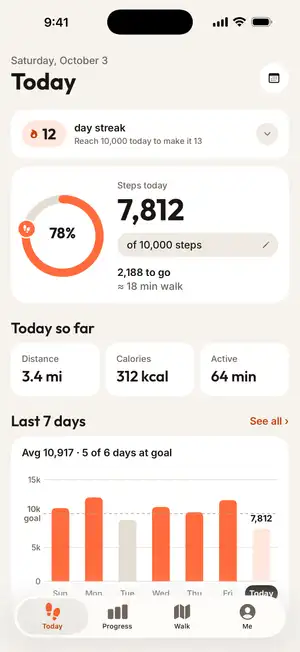
A streak that survives one missed day

Reach your goal to grow your streak. Missed a day? A freeze keeps the streak alive — 1 a month free, unlimited with Premium. The last 7 days show goal days, frozen days and today at a glance.

YESTERDAY12 days
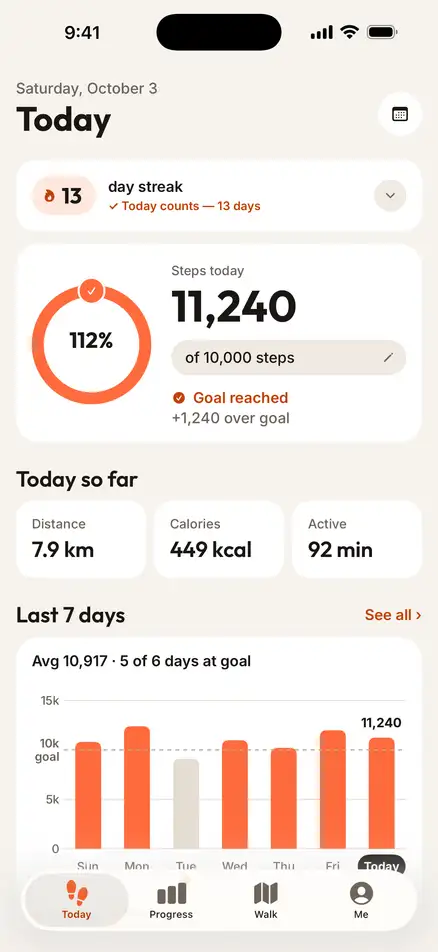
TODAY13 days
Today counts
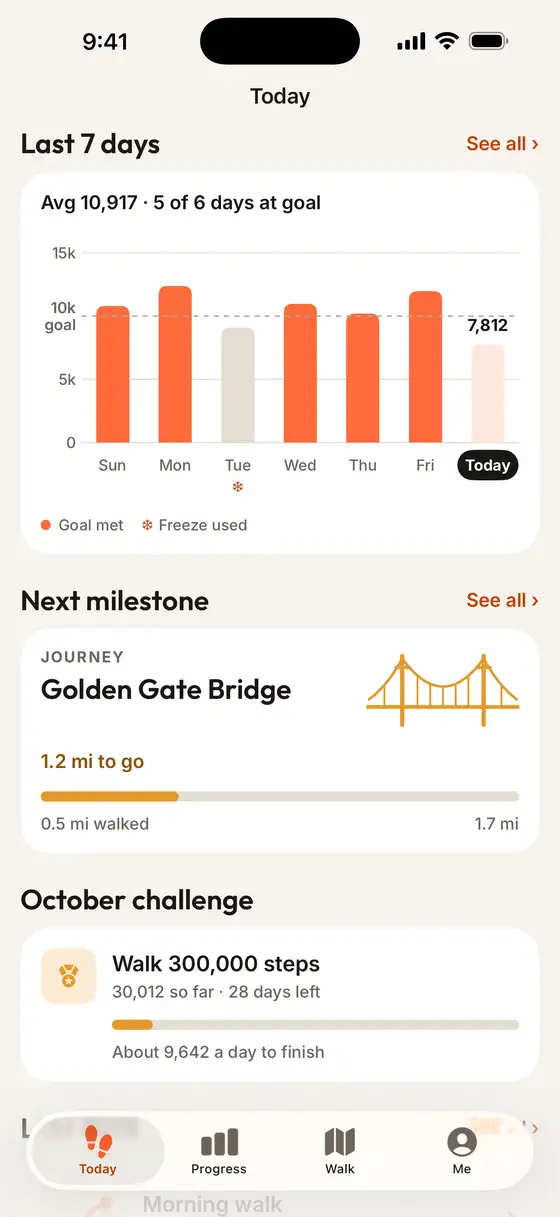
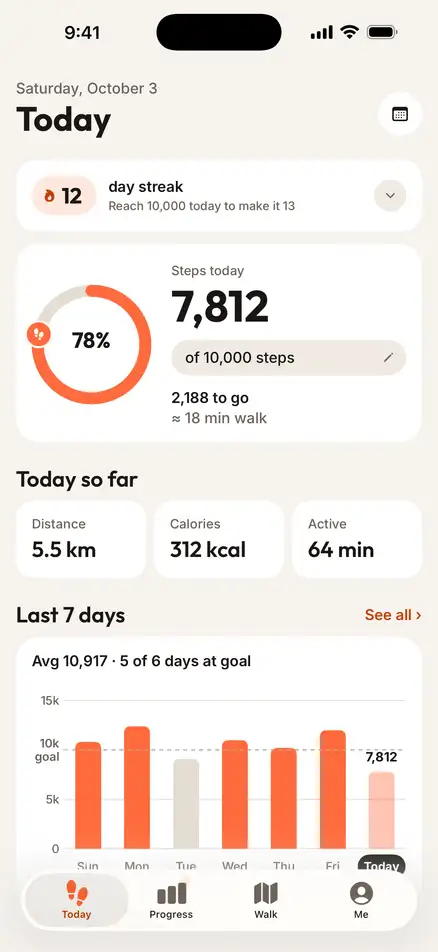
Last 7 days: average 10,917 steps, 5 of 6 days at goal, one frozen day
5 of 6 days at goal

Progress

Honest week-to-week comparisons

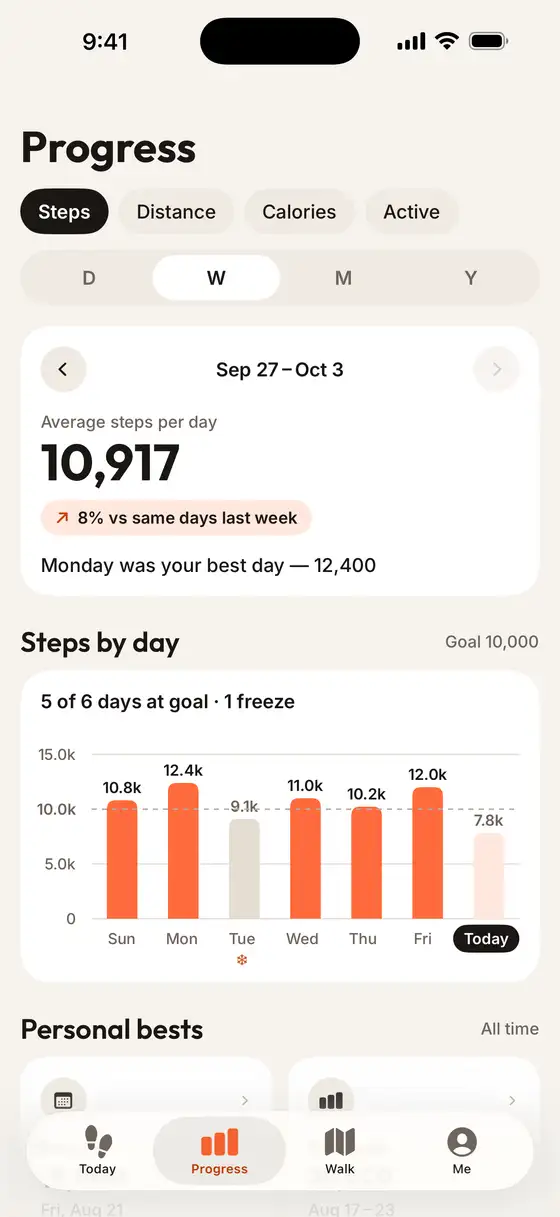
Day, week and month views compare you with the same days last week — not with a finished week. Personal bests and insights show your best day and your most active hour. Year view and the 90-day trend are Premium.

AVERAGE10,917
BEST DAY12,400
+8 %
Progress week view: 10,917 average steps per day, 8% more than the same days last week
+8 % vs last week

GPS walks

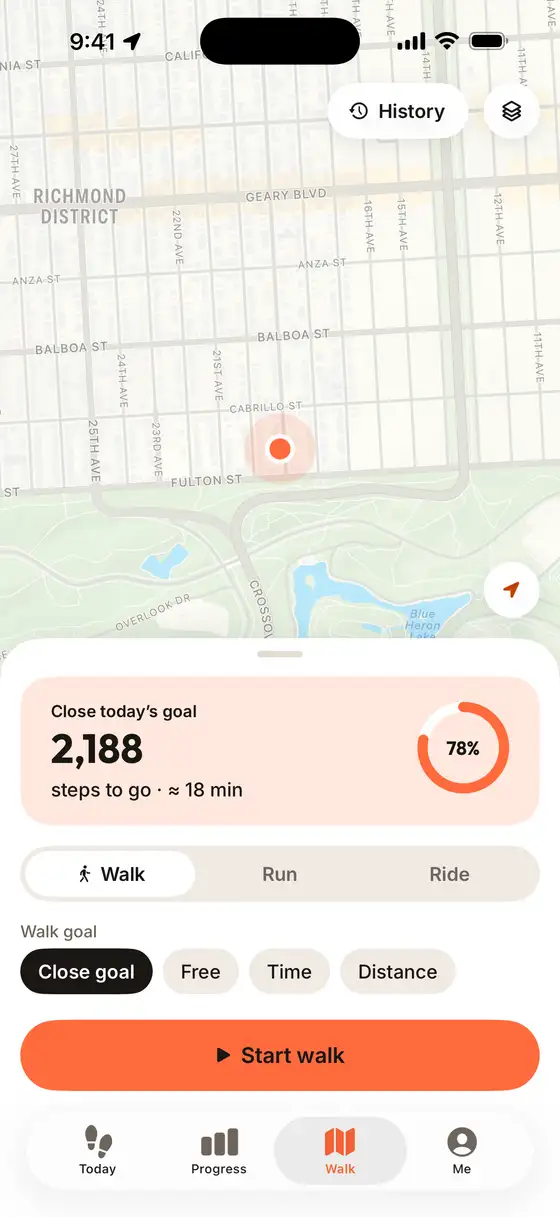
Close today’s goal with a walk

Short of your goal in the evening? Start a «Close today’s goal» walk: it shows the steps left and roughly how long they take. After the walk you get the route map and a summary. Runs, rides, splits and saving walks to Apple Health are Premium.

TO GO2,188
WALK≈ 18 min
Goal closed
Free tool: Steps to km & calories →
Walk tab: close today’s goal, 2,188 steps to go, about 18 minutes, Start walk
≈ 18 min walk

Achievements

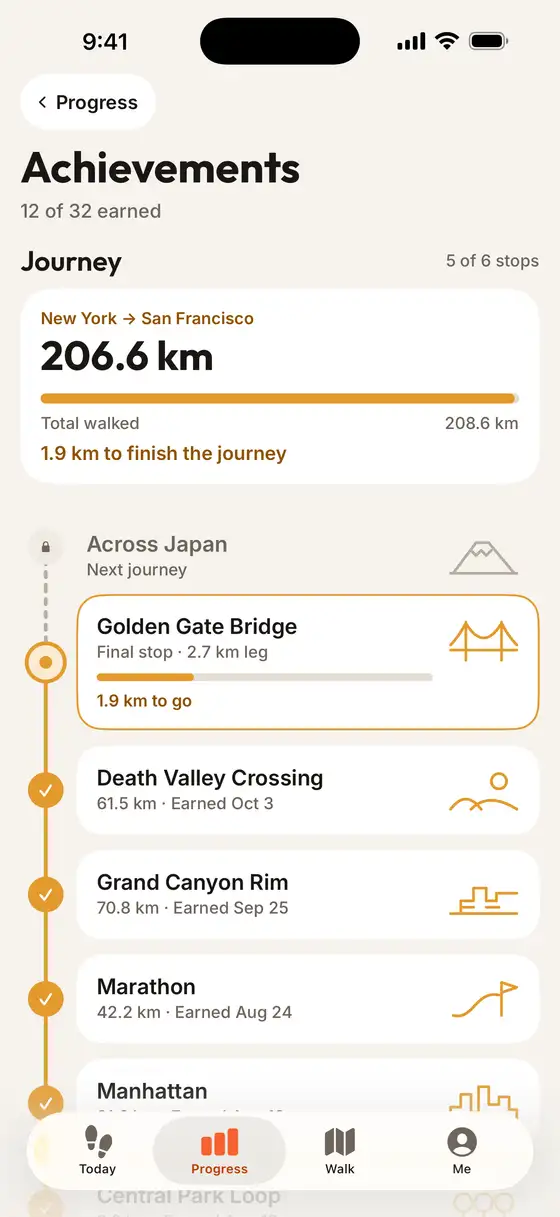
Walk from New York to San Francisco

Your walking distance moves you along journeys past places like the Golden Gate Bridge and the Grand Canyon. Badges for streaks, daily records and total steps use real thresholds, not days since install.

WALKED206.6 km
JOURNEY208.6 km
5 of 6 stops
Achievements: journey New York to San Francisco, 206.6 of 208.6 km walked, 12 of 32 badges earned
12 of 32 badges

How it works

Set up once, then just walk.

  1. 1

    Allow Motion or Apple Health

    The app shows your real last 7 days right away. Every permission has «Not now».

  2. 2

    Pick a goal

    Easy, Recommended or Challenge — suggested from your own average, or set your own.

  3. 3

    Walk as usual

    Steps count all day. An evening reminder tells you how many are left.

Made for

Made for everyday walking.

  • A daily goal

    A ring with a runner shows how far you are

  • Evening top-up

    Steps to go ≈ minutes, then a GPS walk

  • Keeping a streak

    A freeze saves it on a missed day

  • Weekly check-in

    Compared with the same days last week

  • A glance at the Lock Screen

    Widgets and a Live Activity

  • Steps to km

    Free converter with your height

Widgets

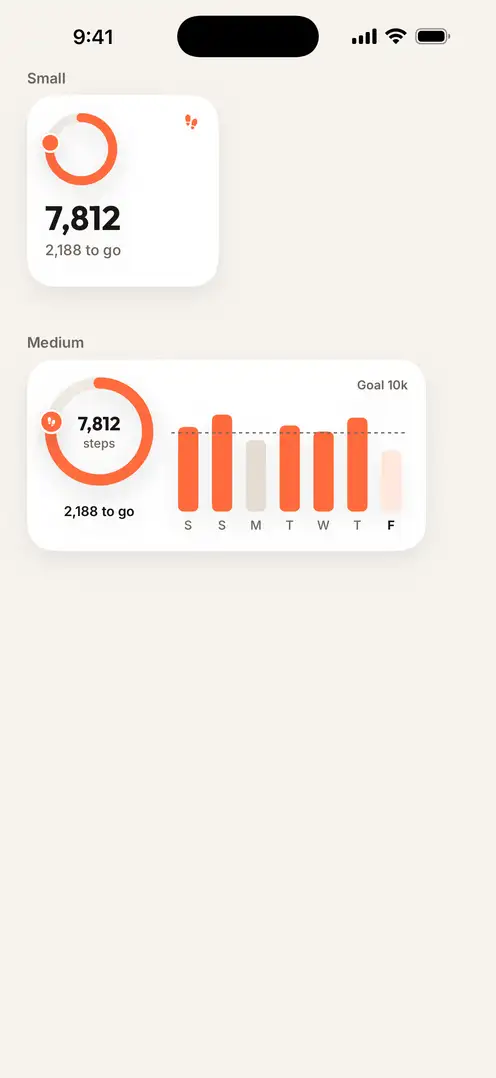
Your steps on the Home Screen and Lock Screen

A small widget with the ring, a medium one with the week and the goal line, a Lock Screen ring and a Live Activity — with Pause and Finish buttons during a walk. Basic widgets are free; all sizes and themes come with Premium.

Small & mediumLock ScreenLive Activity
Small and medium Home Screen widgets: 7,812 steps, 2,188 to go, last 7 days

Your step history stays on your iPhone

Steps come from Apple Health or the iPhone’s motion sensor and are stored on your iPhone. No account, no sign-up.

  • No account, no sign-up

    Open the app and walk. No email, no profile.

  • Location only for walks

    Location is asked for when you start your first GPS walk.

  • Ads in the free version

    Free users see ads, with a consent form where required. Premium removes them.

FAQ

Questions, answered

Still stuck? Write to support — a real person answers, usually within a day.

Contact support →

Is Step Counter free?

Yes. Step counting, your goal, streaks with 1 freeze a month, day / week / month progress, achievements, GPS walks, reminders, the Live Activity and basic widgets are free. The free version shows ads. Premium (in-app subscription) removes ads and adds the year view and 90-day trend, runs and rides, splits, GPX export, saving walks to Apple Health, unlimited freezes and all widget sizes and themes.

Do I need to press start?

No. Steps are counted automatically — from Apple Health if you connect it, otherwise from the iPhone’s motion sensor. GPS walks are optional: they add a route and don’t change how steps are counted.

Does it work with Apple Health?

Yes. Connect Apple Health and the app reads your step history — and grants the badges you have already earned.

What is a streak freeze?

Your streak counts the days in a row you reach your goal. A freeze covers a missed day so the streak doesn’t break: 1 a month free, unlimited with Premium. Frozen days show ❄.

Kilometres or miles?

Both. Pick km or mi (and kg or lb) in Me — the default follows your region, and the choice applies everywhere, including widgets and the Live Activity.

Are there widgets?

Yes: small and medium Home Screen widgets, a Lock Screen ring and a Live Activity with Pause and Finish buttons during a walk.

Get Step Counter

Free on the App Store · Contains ads · In-app purchases · iPhone

Download on theApp Store
Get on the App Store